Turn on Low Power Mode, Adaptive Power, or Battery Saver right now, drop your screen brightness, and switch to Wi‑Fi or Airplane Mode if your signal is weak. Restart your phone and check your battery settings for the app or process causing the drain. If none of that helps after a full day of troubleshooting, your battery health likely needs a professional look, and possibly a replacement.
TL;DR:
- Battery drain is often caused by weak signal, screen brightness, or background apps, which can be addressed with quick setting adjustments.
- Checking your battery’s health and usage details is crucial; a capacity below 80% usually signals significant wear requiring professional replacement.
- Software updates, extreme temperatures, or malware may cause temporary drain spikes that resolve within 24 to 48 hours without hardware fixes.
- If battery capacity is significantly degraded, persistent drain despite troubleshooting indicates a need for certified repair or replacement.
- A same-day diagnostic from a professional repair service can save time and ensure proper battery replacement, avoiding unnecessary DIY risks.
Table of Contents
- Five Quick Fixes You Can Do in Under Five Minutes
- How Do You Check Battery Usage and Battery Health?
- Common Causes of Fast Battery Drain and How to Fix Each One
- When Settings Won’t Help: Diagnosing Battery Wear
- Why Some Battery Problems Are Temporary
- Our Take on Chasing a Battery Problem
- Get Your Battery Fixed the Same Day, Not Next Week
- Sources
Five Quick Fixes You Can Do in Under Five Minutes
Before you dig into settings menus or worry about a hardware problem, run through this checklist. Most cases of a phone battery draining fast trace back to something fixable in the time it takes to read this section.
- Turn on your power‑saving mode. On iPhone, go to Settings > Battery and toggle Low Power Mode (or Adaptive Power on newer models). On Android, open Settings > Battery and switch on Battery Saver or Adaptive Battery. Both cut background activity and throttle performance just enough to stretch your runtime without making the phone unusable.
- Cut your brightness and screen time. Drop brightness manually or let auto‑brightness handle it, turn on dark mode if you have an OLED display, and shorten your auto‑lock timer to 30 seconds. The display is usually the single largest power draw on any smartphone.
- Fix your connection. If you are in a basement, elevator, or rural dead zone, switch to Wi‑Fi or flip on Airplane Mode temporarily. Weak cellular signal is one of the most overlooked reasons your phone battery drains fast, because the radio has to work harder to find a tower.
- Turn off what you’re not using. Bluetooth, Wi‑Fi scanning, and hotspot features all sip power even when idle. If you’re not actively using them, switch them off from your control center or quick settings panel.
- Find your top battery hog, then restart. Check your battery usage screen (covered in detail below), force‑stop or close the worst offender, and restart your device. A simple reboot clears out memory leaks and stuck background processes that quietly chew through charge, and it’s also worth checking for a pending OS or app update while you’re in there.
Run this list once, then use your phone normally for a couple of hours before judging whether it worked. Software fixes need a little time to show their effect.
How Do You Check Battery Usage and Battery Health?
Your phone already tracks exactly what’s draining it. You just have to know where to look.
On iPhone, open Settings > Battery to see your Daily Usage chart, then tap “Show Detailed Usage” or the app list underneath to compare Screen Time against Background Activity for each app. If an app shows heavy background use but you rarely open it, that’s your culprit. Scroll down to Battery Health & Charging and check Maximum Capacity. Apple’s own guidance treats a reading near or below 80% as the point where most people notice a real drop in daily runtime.
On Android, whether you’re on a Pixel, a Galaxy, or another brand, the path is Settings > Battery > Battery Usage (sometimes labeled “Usage since full charge”). This breaks down consumption by app and by system process. Samsung devices specifically let you boot into Safe Mode to isolate whether a downloaded app is responsible, a step Samsung support recommends before assuming the worst. General Android guidance also points to Adaptive Battery and app‑by‑app optimization as the first line of defense.
A few things to watch for when reading these screens:
- A single app dominating “Background Activity” usually means a permissions or refresh setting needs adjusting, not a factory reset.
- If “Cellular” or “Mobile Network” or a system service like “Searching for Service” tops the list, your problem is signal, not software. Check your connectivity before anything else.
- High “On-Screen” time paired with normal background numbers usually just means you used your phone a lot. That’s not a malfunction.
Common Causes of Fast Battery Drain and How to Fix Each One
Once the quick fixes are out of the way, it helps to understand why your phone battery drains fast in the first place. Each cause has its own fix.
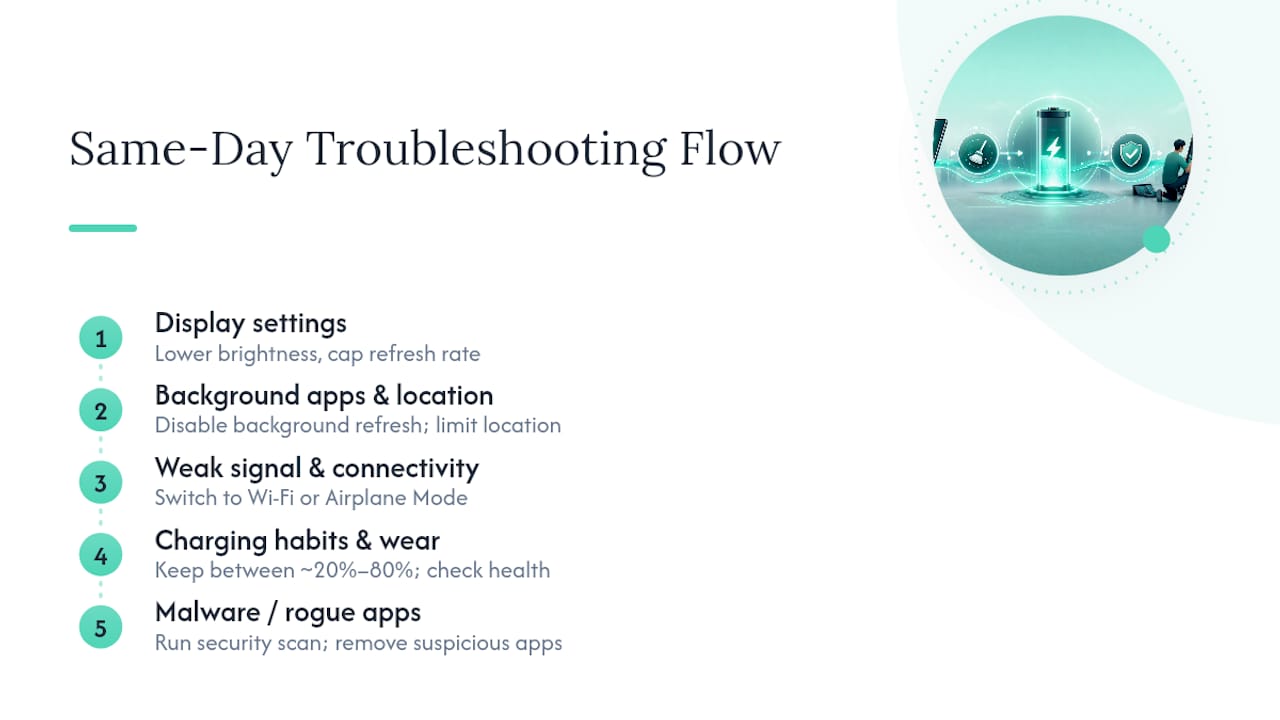
Display settings. Your screen is almost always the biggest single power draw. Lower brightness, cap your refresh rate if your phone offers a 60Hz option instead of 120Hz, and turn off always‑on display. If you have an OLED screen, dark mode genuinely helps here, since black pixels draw close to no power on that display type, unlike an LCD where the backlight stays on regardless of color.
Background apps and location tracking. Go into Settings and disable Background App Refresh (iPhone) or restrict background activity (Android) for apps you don’t need refreshing constantly, think social media, shopping apps, or games you haven’t opened in weeks. Then check each app’s location permission. Switching from “Always” to “While Using the App” for anything that doesn’t need constant GPS access, like a weather app or a retailer’s app, can noticeably slow the drain.
Weak signal and connectivity. When your phone can’t find a strong cellular connection, it boosts transmit power to keep searching, and that pulls a surprising amount of energy. Switching to Wi‑Fi, enabling Wi‑Fi calling, or using Airplane Mode in a dead zone stops that power spike immediately.
Software updates and background indexing. If your battery draining fast started right after an update, don’t panic. Post-update background indexing and re-optimizing tasks commonly spike battery use for 24 to 48 hours before settling down on their own, according to reporting on recent iOS updates. Give it two full days before assuming something is broken.
Temperature extremes. Heat and cold both hit lithium‑ion batteries hard. Northwestern University’s guidance notes that extreme temperatures can cause temporary, sometimes dramatic, drops in reported charge, and performance typically returns once the device is back in a comfortable range. Get your phone out of direct sun, off a hot dashboard, or out of freezing pockets, and let it acclimate before judging its battery.
Statistic to remember: A battery health reading under roughly 80% of original capacity is the threshold Apple itself flags as the point where most users notice materially shorter runtime, a useful benchmark whether you’re on iPhone or Android.
Malware or rogue apps. Persistent drain even when your phone sits idle, paired with unusual data usage, can point to malware or a poorly coded app. Norton’s troubleshooting guidance recommends running a security scan, removing anything unfamiliar or recently installed right before symptoms started, and considering a factory reset as a last resort if the drain won’t quit.
Charging habits and battery wear. Keeping your phone between roughly 20% and 80% charge most of the time reduces long‑term wear, and fast chargers generate more heat, which accelerates degradation over time. If you’re already doing everything right and still losing capacity fast, wear is catching up with the battery, not your habits.
Pro Tip: Before you blame any single app, put your phone in Safe Mode (Android) or a fresh restart (iPhone) and watch how it drains for an hour with no third‑party apps running. If the drain disappears, you’ve just isolated the problem to something you installed, not the hardware itself.
When Settings Won’t Help: Diagnosing Battery Wear
Software tweaks can only do so much. If your battery health metric has dropped, no combination of toggles will bring back the runtime you used to get.
- Check your Maximum Capacity (iPhone) or battery health indicator (Android). A reading below 80% is the general threshold worth treating seriously.
- Watch for hardware red flags: the phone shutting down randomly at 20% or higher, the percentage jumping erratically, the device draining fast even sitting untouched overnight, or visible swelling in the case or screen.
- Weigh DIY replacement against certified repair. A DIY battery swap can work, but it risks damaging the flex cable, using an uncertified part with inconsistent capacity, or voiding whatever warranty remains, and lithium‑ion batteries are not forgiving of careless handling.
- A professional same‑day repair typically includes a diagnostic to confirm the battery is actually the problem, replacement with a quality‑tested part, and a warranty that covers you if something goes wrong after the fact.
If you’re weighing your options, it’s worth reading about what professional iPhone repair services actually involve before deciding to open the phone yourself.
Why Some Battery Problems Are Temporary
Not every scary battery moment is a hardware failure. Your phone’s behavior right after an update, in a heat wave, or in a parking garage with no signal can look identical to genuine battery wear, but it resolves on its own.
Background indexing after a major software update is a normal, temporary process, not a defect, and it typically settles within 24 to 48 hours without you doing anything at all.
Extreme heat or cold can also cause a temporary, sharp drop in reported charge that recovers once your phone returns to a normal temperature. And a weak cellular signal forces your radio to work overtime, draining you faster until you reconnect to a stronger network or Wi‑Fi. When the cause really is hardware, that’s where certified diagnostics matter: Some professional repair services complete repairs the same day using quality-tested parts installed by certified technicians, sometimes backed by a warranty on the work.
Our Take on Chasing a Battery Problem
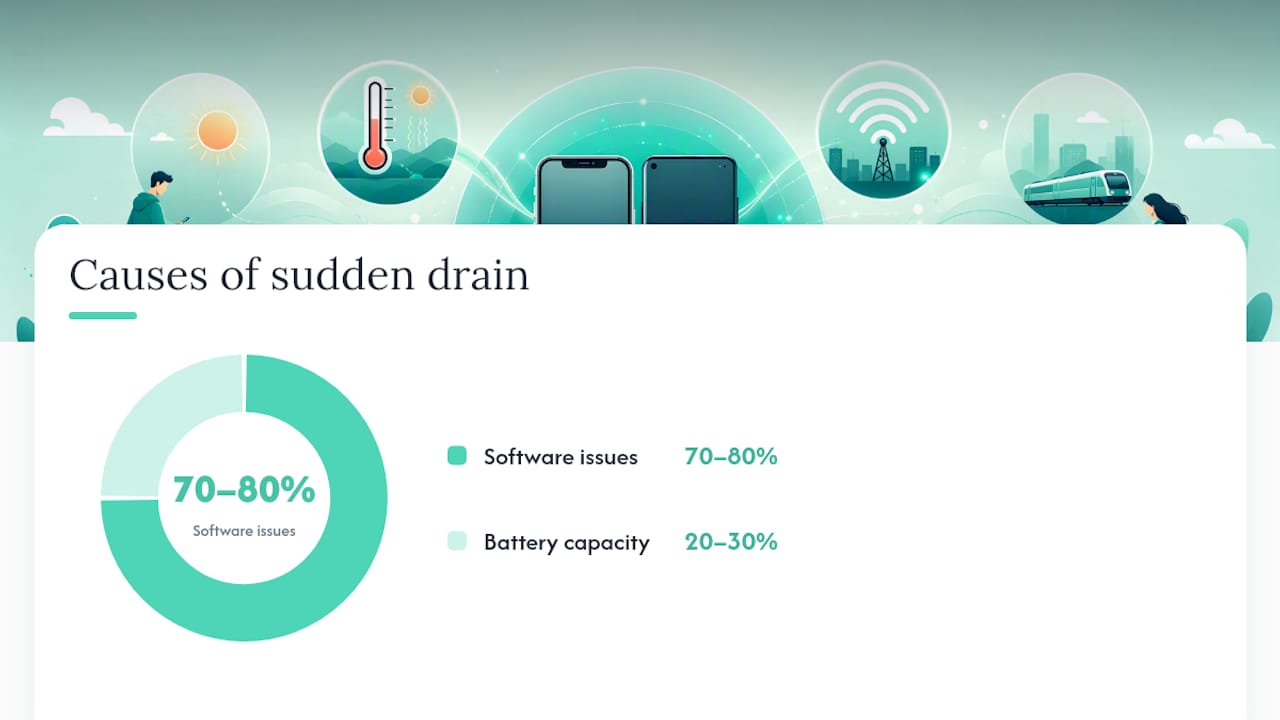
Most advice on battery draining fast treats every symptom the same way, as if brightness settings and a worn‑out cell are equally solvable with a software tweak. They’re not. The honest read of the evidence is that maybe 70 to 80% of sudden drain complaints are temporary or software‑related: a bad signal, a post‑update indexing spike, an app that needs its permissions reined in. The rest is a battery that has genuinely lost capacity, and no amount of toggling Low Power Mode will fix chemistry.
Where conventional advice falls short is in telling people to just keep tweaking settings indefinitely. If you’ve run the checklist, waited out an update, and checked your battery health reading and it’s still under 80%, more troubleshooting is wasted time. Prioritize the diagnosis first: pull up your battery health number before you touch another setting. That single number tells you whether you’re solving a five‑minute problem or scheduling a repair.
— SS
Get Your Battery Fixed the Same Day, Not Next Week
Mobilecareusa is the alternative to waiting on a mail‑in warranty claim or gambling on a DIY battery kit.
You’ll want a real diagnostic before paying for a new battery, since some drain issues turn out to be software after all, and that’s exactly what a same‑day visit gives you: a technician who checks your battery health, confirms the actual cause, and only replaces what needs replacing. Bring your device charged if possible, and skip the guesswork of ordering parts online and hoping they match your model.
Browse our full device repair services to see what’s covered, or find the Mobilecareusa location near you and book your battery diagnostic today.
Sources
- Apple Support — If the battery in your iPhone or iPad drains too quickly
- Android — Tips to extend Android battery life
- Northwestern University — Protecting your mobile devices from extreme temperatures
- OSXDaily — Is iPhone battery life worse after installing iOS 26.3?