A hinge-only laptop repair typically runs $60 to $250, while damage that spreads to the screen or rear casing pushes the total to $150 to $700 or more. The exact number depends on your laptop’s model, whether the shop uses OEM or aftermarket parts, and how bad the damage really is. Before you commit to any number, get a diagnostic. It’s the only way to know which price band your laptop actually falls into.
TL;DR:
- Hinge repairs usually cost between $60 and $250 for straightforward fixes, but can reach $700 or more if display or casing damage occurs.
- OEM hinge parts generally cost $30 to $40 each, while aftermarket options can be 30% to 50% cheaper but may have durability issues.
- The repair time ranges from one to three days, depending on parts availability, with same-day service possible for in-stock hinges.
- Choosing a repair shop that provides a clear diagnosis, itemized quote, and warranty of 30 to 90 days ensures better value and reduced risk of future failure.
- DIY repairs are risky unless the hinge is loose and intact, as errors can cause significant additional damage and lead to higher costs.
Table of Contents
- How Much Does Laptop Hinge Repair Cost?
- What Factors Change Your Laptop Hinge Repair Cost?
- Should You Attempt a DIY Laptop Hinge Fix?
- How Long Does Hinge Repair Take, and What Warranty Should You Expect?
- What Should You Ask For When Getting a Hinge Repair Quote?
- How Mobile Care Handles Hinge Repairs
- What Technicians Actually Check When Diagnosing a Hinge
- Why the Cheapest Quote Isn’t Always the Smartest One
- Get a Real Quote Instead of Guessing at Your Repair Cost
- Where These Cost Figures Come From
- Sources
- FAQ
How Much Does Laptop Hinge Repair Cost?
The math behind a hinge repair bill comes down to two line items: parts and labor. Understanding both helps you sniff out a fair quote versus one padded with unnecessary charges.
Replacement hinge kits generally cost between $20 and $150. The spread depends heavily on whether you’re buying OEM (original equipment manufacturer) parts or aftermarket equivalents. Manufacturer parts stores list individual hinges for common models in the $30 to $40 range, which gives you a solid benchmark for checking whether a shop’s parts charge is reasonable.
Labor is where costs diverge more sharply. Most repair shops charge $60 to $150 per hour for hinge work, and a straightforward hinge replacement usually takes one to three hours depending on how the laptop’s chassis is assembled. Ultrabooks with unibody designs often take longer to open safely than older, screw-heavy business laptops.
Here’s how those numbers play out across three common scenarios:
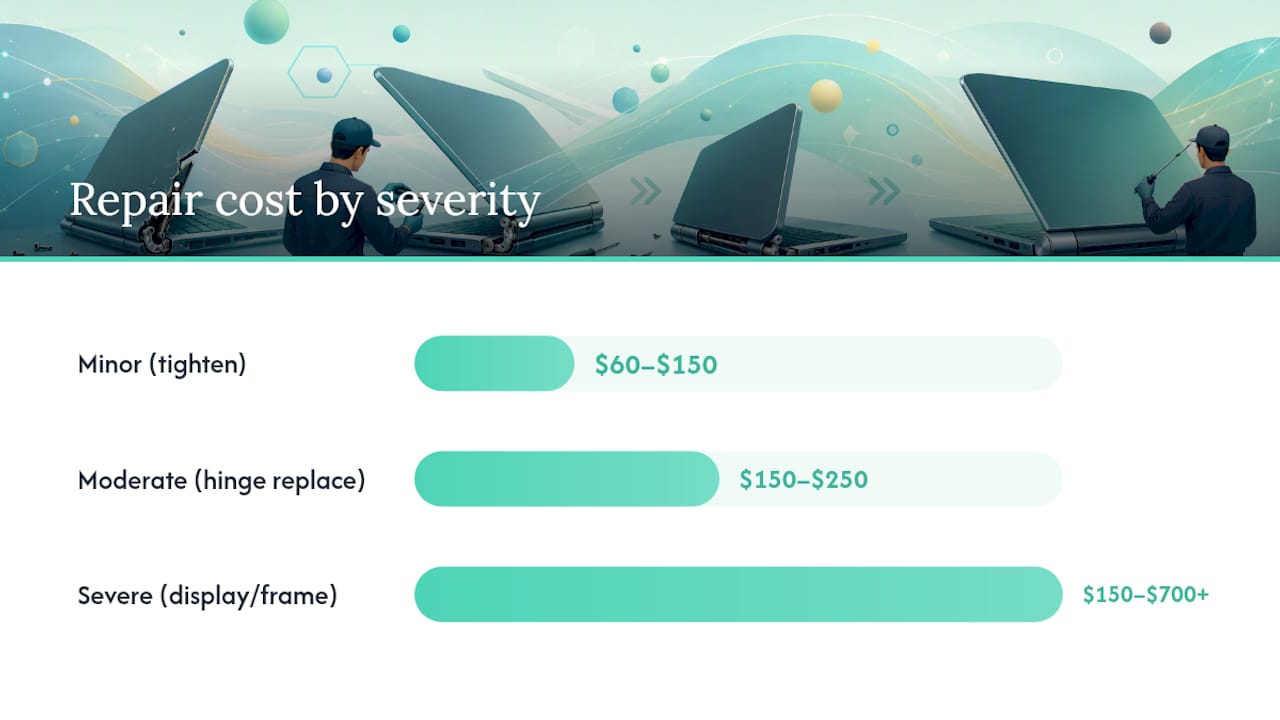
| Scenario | Parts | Labor | Total Range |
|---|---|---|---|
| Minor (tighten or re-seat hinge) | $10 to $30 | $60 to $150 | $60–$150 |
| Moderate (hinge replacement, minor bezel repair) | $30–$80 | $60 to $250 | $150 to $250 |
| Severe (display assembly or frame replacement) | $80–$300 | $150 to $500 | $150 to $700 or more |
These bands line up with what Cost Insider’s aggregated data shows for U.S. repairs: hinge-only jobs commonly land in a moderate price range, while severe cases involving display or chassis parts can be substantially more expensive. Real-world anecdotes tell a similar story. Users in a Dell community thread reported totals ranging from about $50 for simple tightening jobs up to $250 or more once the back cover or display assembly needed replacing.
A few things drive a bill toward the higher end of any range:
- The hinge has already pulled loose from the chassis, requiring frame work instead of a simple swap
- The display cable was pinched or torn when the hinge failed
- The laptop’s bezel cracked and needs full replacement, not just a hinge fix
- Your model uses a proprietary hinge assembly that only the manufacturer sells
What Factors Change Your Laptop Hinge Repair Cost?
Two laptops with identical hinge damage can generate wildly different bills. Here’s why.
Brand and model matter more than most owners expect. Ultrabooks and MacBooks tend to cost more to repair because their hinges are often integrated into the display assembly rather than sold as standalone parts. When the hinge and the screen frame are one unit, a “hinge repair” can become a “display assembly replacement” overnight, which is exactly how a $150 quote turns into a $500 one.
Scope of damage compounds fast. A hinge that’s simply loose is a quick fix. A hinge that’s torn away from a cracked bezel, with a stressed display cable underneath, means the technician is now replacing three things instead of one. Damage tends to cascade in laptops because the hinge sits at the mechanical center of the whole display assembly.
Parts source creates a real tradeoff. OEM parts cost more but fit exactly and usually last as long as the original. Aftermarket hinges save money upfront, sometimes 30% to 50% less, but fit and durability vary by supplier. A loose-fitting aftermarket hinge can fail again within months, meaning you pay twice.
Region and urgency add their own premium. Labor rates and parts availability shift by location, creating swings of roughly 15% to 25% in the final bill between markets. Rush service, when a shop bumps your laptop ahead of the queue, typically adds its own surcharge on top.
Pro Tip: Ask the shop whether they’re quoting OEM or aftermarket parts before you agree to anything. A $40 difference in the parts line often explains a $100 gap between two quotes for the identical repair.
Should You Attempt a DIY Laptop Hinge Fix?
DIY hinge kits sell online for $10 to $60, which looks like an easy win against a $150+ professional quote. The math only works out if nothing goes wrong, and laptop hinges are unforgiving of mistakes.
The most common DIY failures aren’t dramatic. They’re small errors that turn a $60 job into a $300 one:
- Stripped screws on the hinge bracket, which then require drilling out and re-tapping, or a full bracket replacement
- A torn display cable, often pinched while removing the bezel, that turns a hinge fix into a screen replacement
- A cracked bezel from prying too hard with the wrong tool, forcing a full assembly swap instead of a spot repair
- Reassembly issues where screws go back in the wrong length hole, cracking the case weeks later
DIY makes sense for one narrow case: a hinge that’s simply loose but still structurally intact, where the fix is retightening screws or adding thread locker. Skip DIY entirely if the hinge has detached from the housing or the case itself is cracked. That’s assembly-level damage, and one wrong pry-tool angle turns a moderate repair into a severe one.
If you do attempt it, back up your data first, work on a clean well-lit surface, use the correct screwdriver bit size (not a close-enough substitute), and photograph each step as you remove screws. Those photos are the only reliable way to reassemble a laptop correctly three hours later.
How Long Does Hinge Repair Take, and What Warranty Should You Expect?
Turnaround depends almost entirely on parts availability. A shop with the hinge in stock can often finish a minor repair the same day. Standard repairs that need a part ordered typically take one to three days, and anything requiring a specialty display assembly can stretch longer if the part has to come from the manufacturer.
Before you drop off your laptop, ask about two things that affect your final bill and your peace of mind:
- Diagnostic fees. Some shops charge a flat fee to inspect the laptop, and that fee is sometimes credited toward the repair if you move forward. Always ask this upfront, not after the inspection.
- Warranty terms. Reputable shops commonly back parts and labor with a 30 to 90 day warranty. Get the exact terms in writing, including whether it covers the hinge only or the full repair.
A shop that won’t commit to a warranty on hinge work is telling you something about how confident they are in the fix.
What Should You Ask For When Getting a Hinge Repair Quote?
A useful quote requires giving the shop enough information to price the job accurately, and asking enough questions to compare it against competitors.
Before you call or visit, gather:
- Your laptop’s exact model number (found on the bottom label or in system settings)
- Close-up photos of the hinge damage from multiple angles
- A clear description of the symptoms: does it wobble, creak, or fail to hold the screen at any angle?
Once you have a quote in hand, ask:
- Will the diagnosis happen in person, or is this estimate based on your description alone?
- Are the replacement parts OEM or aftermarket, and can they show you the part number?
- What’s the labor estimate in hours, and does the quote separate parts from labor?
A clear split between parts and labor on paper makes it far easier to compare estimates from different shops side by side. Watch for red flags: a quote with no itemized breakdown, language like “may need” additional parts without an actual inspection, or a price that seems suspiciously lower than every other estimate you’ve gathered. To compare two or three quotes quickly, line up each shop’s parts cost, labor hours, and warranty terms in a simple list. The shop that’s vague on any one of those three is usually the one to skip.
How Mobile Care Handles Hinge Repairs
Mobile Care repairs laptop hinges alongside phones, tablets, and wearables, with most repairs completed same-day, often in 30 to 45 minutes depending on the device and damage. Every repair comes backed by a 30-day warranty on parts and labor.
Technicians use quality-tested parts for repairs, and customers can ask the store which parts will be used for their specific model before committing. Bringing along your laptop’s model number and a few close-up photos of the damaged hinge speeds up the in-store diagnosis considerably.
If you’re comparing options, it’s worth putting a quote from Mobile Care’s locations side by side with other local estimates using the checklist above. That comparison, not a single number, is what tells you if a price is fair.
What Technicians Actually Check When Diagnosing a Hinge
A proper hinge diagnosis isn’t a glance and a guess. Technicians work through a specific sequence, and knowing it helps you understand why one repair costs $80 and another costs $400.
Visual inspection comes first: cracks in the housing near the hinge mount, missing or stripped screws, and brackets bent out of their original shape. Then come functional checks, opening and closing the lid slowly to feel whether the hinge moves smoothly or catches, checking for stress marks on the display cable where it routes through the hinge, and confirming the screen holds a consistent angle without drifting.
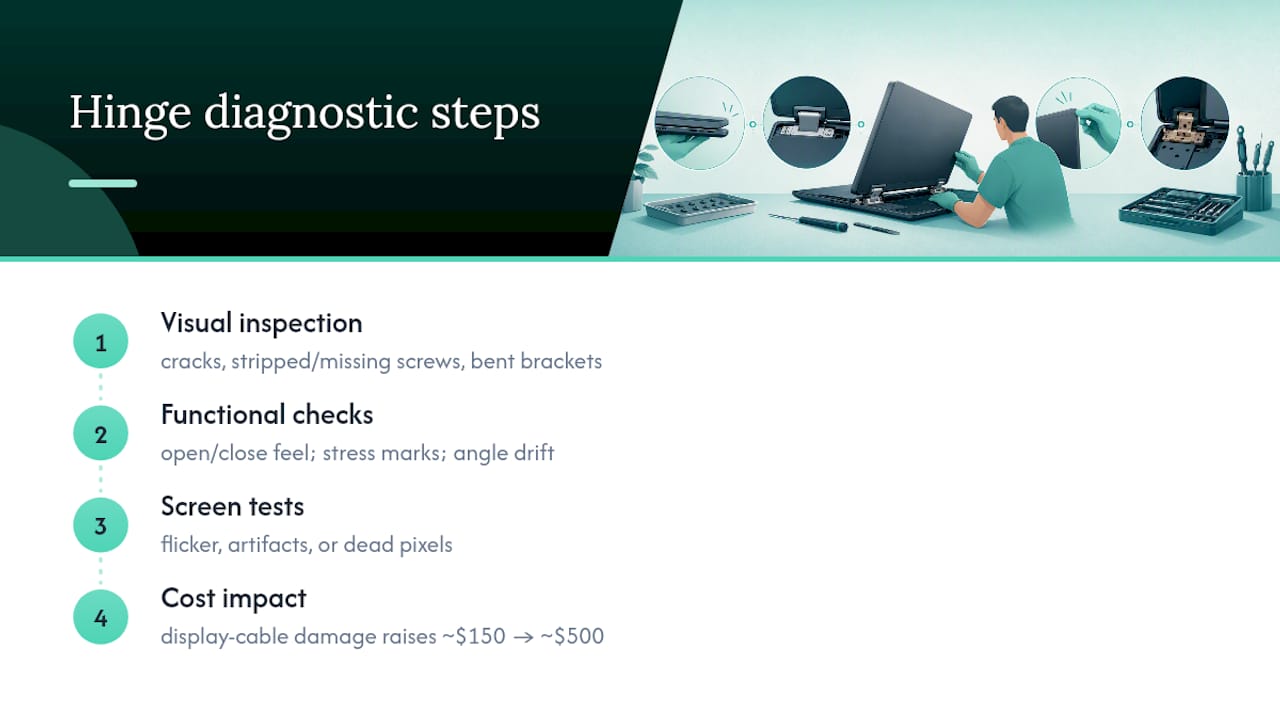
The real cost driver shows up in the next step: screen tests. Flickering, artifacts, or dead pixels during that inspection usually mean the display cable took damage from the hinge failure, and that’s the difference between a $150 fix and a $500 one.
Why the Cheapest Quote Isn’t Always the Smartest One
The instinct with any repair quote is to chase the lowest number, and with hinge repairs, that instinct backfires more often than it should. A rock-bottom price on a hinge job almost always means aftermarket parts with no warranty backing them, or a shop that hasn’t actually inspected the display cable for hidden damage.
What actually separates a good quote from a risky one isn’t the total dollar figure. It’s whether the shop gave you a real diagnosis before quoting, split parts from labor on paper, and stood behind the work with a written warranty. A $300 quote with a 90-day warranty and OEM parts is a better deal than a $150 quote with no warranty and a part nobody can name.
The other pattern worth noticing: hinge failure is usually the first symptom, not the last. Owners who address a wobbly hinge early, before it stresses the display cable or cracks the bezel, consistently land in the lower end of every price band in this article. Owners who wait usually don’t.
— SS
Get a Real Quote Instead of Guessing at Your Repair Cost
Mobile Care gives you a same-day answer instead of a multi-day wait for a diagnosis. Most repairs, hinge jobs included, are completed in 30 to 45 minutes using quality-tested parts, backed by a 30-day warranty on both parts and labor.

If your laptop’s hinge is wobbling, creaking, or has already separated from the casing, get it looked at before the damage spreads to the screen or bezel, where costs climb fast. Bring your model number and a couple of photos of the damage, and a technician can give you a clear parts-and-labor breakdown on the spot rather than a vague estimate. Mobile Care has built its reputation on that kind of transparency, reflected in a 4.8 out of 5 rating from more than 2,000 customers. Stop by or schedule a diagnostic at your nearest Mobile Care location and find out exactly what your repair will cost before you agree to anything.
Where These Cost Figures Come From
- Cost Insider’s hinge repair guide supplied the aggregated cost ranges, scenario breakdowns, diagnostic fee norms, and regional variance figures used throughout this article.
- Dell’s laptop hinges parts page provided real OEM per-hinge pricing, useful for checking whether a shop’s parts line item is reasonable.
- A Dell community thread on Reddit offered real owner-reported repair totals, adding anecdotal texture to the low end of the cost ranges.
Sources
- Laptop Hinge Repair Cost Guide 2026 – Cost Insider
- Laptop Hinges | Dell
- In your experience, what’s the estimated cost for out-of- … (Reddit)
FAQ
How much does it cost to replace a laptop hinge?
Hinge-only replacement typically runs $60 to $250, while repairs that also require screen or casing work can reach $150 to $700 depending on parts and labor.
Can a laptop hinge be fixed?
Yes. Most hinge damage, from loose screws to a fully detached hinge, can be repaired or replaced by a qualified technician, though severe cases may require replacing the display assembly.
Is it common for laptop hinges to break?
Hinges are one of the most frequent laptop failure points because they endure constant mechanical stress every time the lid opens and closes, and repeated use over a few years commonly weakens the screws or bracket.
My laptop hinge is dislocated. What should I do?
Stop opening and closing the lid, since continued use risks tearing the display cable, and get a diagnostic from a repair shop like Mobile Care before the damage spreads to the screen or bezel.