If your smartwatch’s glass is shattered or you need water resistance and warranty coverage preserved, book a professional repair. If you’re dealing with minor scratches or an isolated touch issue and you already have repair experience, a careful DIY fix is reasonable. Mobilecareusa offers same-day professional service for readers who’d rather skip the risk, but the DIY section below will tell you exactly what you’re getting into either way.
TL;DR:
- Repair costs for smartwatch screens vary widely, with manufacturer services being more expensive and slower, but using genuine parts.
- Water resistance can be significantly compromised during DIY repairs, especially if seals and O-rings are not properly reseated by professionals.
- About 40% of touchscreen issues are software related and can often be fixed with a restart or software update, avoiding unnecessary repairs.
- Professional repairs typically include diagnostics, water resistance testing, and warranties, making them safer for preserving features like Apple Pay.
- DIY repair risks include damaging delicate ribbon cables and losing warranty coverage, so they are only suitable if the user has specific technical skills and the watch is non-critical.
Table of Contents
- Your Options: Manufacturer Service, Local Pro Repair, or DIY Kits
- How to Decide: The Checklist That Actually Matters
- Typical Costs and Turnaround Times for Screen Replacement
- DIY Walkthrough: Tools, Steps, and Where It Goes Wrong
- What Professional Repair Includes and What to Ask a Shop
- Prepare Your Watch for Repair: Backup, Unpair, and What to Bring
- The Real Trade-Off Nobody Explains Well
- Get Your Smartwatch Fixed the Same Day, Not the Same Week
- Sources
Your Options: Manufacturer Service, Local Pro Repair, or DIY Kits
Every cracked smartwatch screen gives you three paths, and each one trades speed, cost, and risk differently.
- Manufacturer service uses genuine parts and can preserve features like Apple Pay, but expect higher cost and slower turnaround, since some models require mail-in shipping rather than a walk-in fix.
- Local pro repair usually delivers same-day or near-same-day turnaround with a workshop warranty, trained technicians, and quality-tested parts — a solid middle ground if you want speed without gambling on the work.
- DIY repair kits are the cheapest route on parts alone, but they demand real tool skill, typically void your remaining warranty, and often compromise water resistance even when the job goes well.
None of these is universally “better.” The right one depends on what your watch means to your daily routine, and how much risk you’re willing to absorb to save money.
How to Decide: The Checklist That Actually Matters
Most people overthink this decision by comparing prices first. Cost matters, but it’s the fourth or fifth question, not the first.
- Compare repair cost to replacement cost. If a screen fix runs close to what a refurbished or new unit costs, replacing the watch often makes more financial sense than repairing it.
- Check what you need preserved. If Apple Pay, Google Pay, or your original manufacturer warranty matters to you, lean toward manufacturer service or an authorized professional shop.
- Weigh water resistance. Opening the case at home nearly always affects the seal, so if you swim, shower, or sweat heavily with your watch on, professional repair with proper reseating is the safer bet.
- Consider your timeline. A local pro offering same-day service beats a multi-day mail-in process when you’re relying on the watch for fitness tracking or notifications you can’t miss.
- Be honest about your skill level. Fused display assemblies, delicate multi-cable connectors, and any task involving battery handling are where DIY attempts go wrong fastest.
Pro Tip: If you notice a swollen back panel, exposed internal components, or any smell of smoke, stop immediately and take the watch to a professional. Battery damage is not a DIY project under any circumstance.
Typical Costs and Turnaround Times for Screen Replacement
Pricing swings widely depending on which route you take, and knowing the ranges upfront keeps you from guessing.
- Manufacturer service follows a structured pricing model built around labor and genuine parts, with Apple’s own support pages outlining the diagnostic and service flow before you commit.
- Local pro shops typically quote a flat rate for popular models like Apple Watch, Galaxy Watch, and Pixel Watch, with same-day completion common and multi-day timelines reserved for rarer parts.
Diagnostics and a simple restart resolve a meaningful share of what looks like screen failure before any repair is needed. One source estimates that roughly 40% of reported touchscreen problems are software related rather than physical damage, which is worth ruling out before you spend a dollar on parts or labor.
Factor in extras too: adhesive, potential shipping fees for mail-in service, and the very real chance that a compromised seal invites a follow-up repair down the line.
DIY Walkthrough: Tools, Steps, and Where It Goes Wrong
If you’re set on doing this yourself, treat it like surgery, not a weekend craft project.
The high-level sequence looks like this:
- Back up your data and power the watch down completely. A full battery drain before opening the case reduces fire risk if the battery is punctured during disassembly.
- Apply gentle heat to soften the adhesive holding the display in place, working slowly around the edges rather than blasting one spot.
- Lift the screen carefully with a suction cup and picks, limiting insertion depth to roughly 2 to 3 millimeters to avoid severing the ribbon cables underneath.
- Release the ZIF connectors and clean the contacts with isopropyl alcohol, since oxidation on these tiny connectors is a common cause of a dead touch zone even after replacement.
- Dry-fit the new screen and test touch response before final adhesive, exactly as iFixit’s Apple Watch Series 9 guide recommends, so you catch a bad connection before it’s sealed shut.
- Reseal with fresh adhesive and let it cure fully before wearing the watch again.
The fragile ZIF clips and ribbon cables inside a smartwatch are not forgiving of impatience. Rushing the pick insertion or skipping the dry-fit test is how a fixable screen turns into a scrapped watch.
For Samsung models specifically, expect back screws and O-rings that need careful reseating to preserve as much of the original waterproofing as possible. And if your issue is a minor scratch rather than a crack, a cerium oxide polish is often enough. Save full replacement for cracks, dead zones, or visible internal damage.
Pro Tip: Isolate whether your problem is hardware or software before you open anything. A forced restart and a fresh unpair/repair cycle costs you nothing and rules out the most common non-hardware causes of a frozen touchscreen.
What Professional Repair Includes and What to Ask a Shop
A legitimate repair shop follows a consistent workflow: free diagnostic, parts sourcing, the repair itself, sensor and touch testing, then a warranty issued on the completed work. That structure exists to catch problems before they become your problem again next month.
Before you hand over your watch, ask these questions:
- Is there a warranty on the repair, and how long does it last?
- Are the replacement parts OEM or tested aftermarket, and how are they quality checked?
- Do you test touch accuracy, heart-rate sensors, and water resistance after the repair, not just visual appearance?
- What’s the expected turnaround, and is same-day service actually available for my model?
Certified technicians matter here because touch calibration and sensor accuracy are easy to get wrong with rushed or untrained work. Before you drop off the watch, remove your accounts, disable Apple Pay or Google Pay, and back up your data. Any shop worth using will tell you to do this anyway.
Prepare Your Watch for Repair: Backup, Unpair, and What to Bring
- Back up your watch data through its companion app, then unpair or factory reset it if the shop requires that step.
- Remove Apple Pay or Google Pay from the device before handing it over, since payment credentials shouldn’t travel with a repair.
- Package mail-in repairs carefully: remove the band, note the model number, and follow the shop’s shipping instructions exactly.
- Bring proof of ownership or ID to an in-person appointment if the shop requests it for verification.
The Real Trade-Off Nobody Explains Well
Most guides on this topic treat DIY and professional repair as equally valid choices separated only by price. That framing undersells what’s actually at stake. A DIY screen swap on a smartwatch isn’t like replacing a phone battery. You’re working with ribbon cables measured in millimeters and connectors that fail permanently if you insert a pick too far.
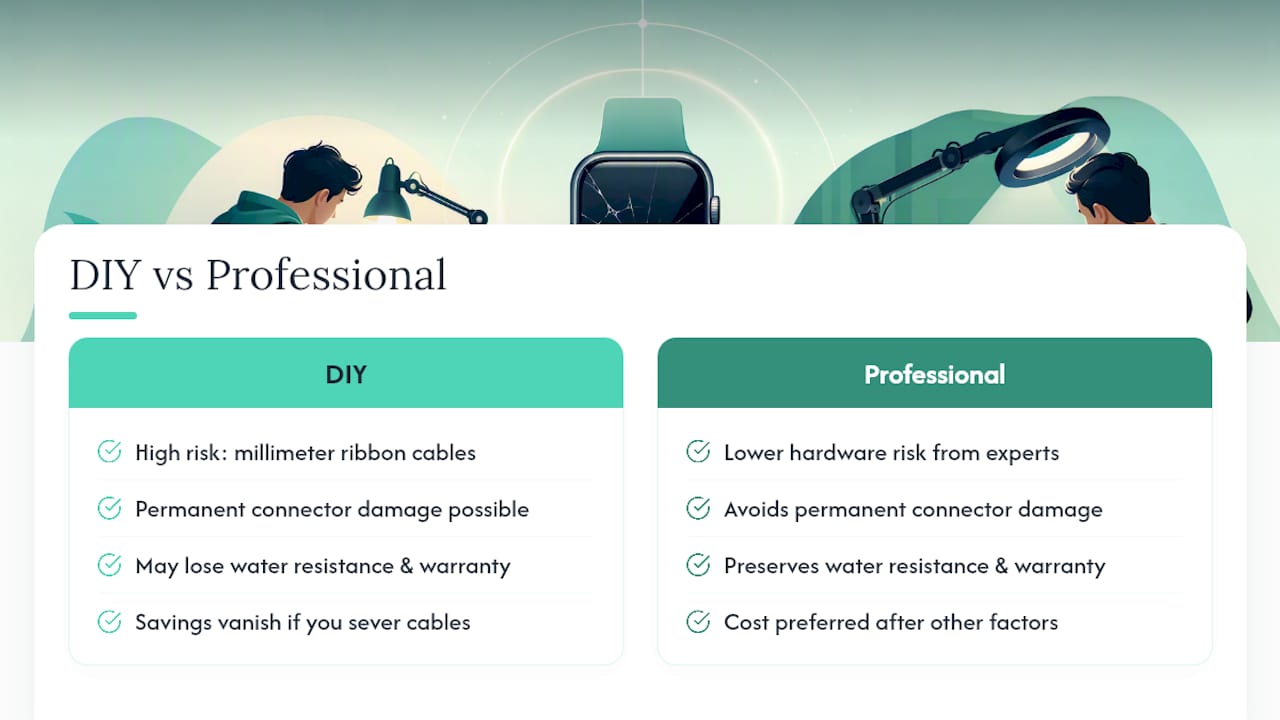
The conventional advice to “just watch a video and do it yourself to save money” ignores that the savings evaporate the moment you sever a ZIF cable or crack a display you can’t return. The honest priority order is this: rule out software causes first, since a real share of touch failures aren’t hardware at all. Then weigh whether losing water resistance and warranty coverage is a price you can live with. Only after that should cost enter the conversation.
If your watch is central to your day, whether that’s tracking a workout, taking calls, or making tap-to-pay purchases, the math almost always favors paying a trained technician once rather than risking a second repair after a DIY attempt goes sideways.
— SS
Get Your Smartwatch Fixed the Same Day, Not the Same Week
Professional repair service is the faster route for anyone who read the DIY section above and decided the risk wasn’t worth it. Many screen repairs can be completed quickly by trained technicians using quality-tested parts, often with a limited warranty backing the work.
That combination, speed without a mail-in wait and a warranty without the DIY gamble, is what separates a Mobilecareusa visit from ordering a $20 replacement screen and hoping your hands are steady enough. It’s built for the reader who needs a working watch back on their wrist today, not a project for the weekend. Highly rated professional repair services handle smartwatches alongside phones, tablets, and laptops, so a cracked screen doesn’t have to become a multi-day disruption.
If you’re near one of our locations, start with a free diagnostic at Mobilecareusa’s Cumberland Mall location or check full service details to see turnaround times and what’s covered before you book.